Cupboard vs a static wallpaper
· 5 min read
An honest comparison of a free still picture and a paid app, so you can decide which suits you.

Here is an unusual article for a product's own blog: an honest case for not buying the product. A static wallpaper is free, silent, light on battery and will never break. If it is all you need, you should use it. So when is a still picture the right answer, and when does an app like Cupboard add something worth paying for?
We will answer that as fairly as we can, because the best outcome is a Mac that you enjoy looking at, with whatever tool gets you there.
What a static wallpaper does well
- It costs nothing. There are thousands of free winter images, and macOS includes plenty of its own.
- It costs no battery. A picture is drawn once. Nothing runs in the background, so your laptop lasts as long as it otherwise would.
- It is quiet. There is no motion to catch your eye while you are trying to concentrate.
- It is simple. Set it in System Settings, and it works on every Mac, with every display and every version of macOS, until you change it.
- It has nothing to maintain. No app to update, no permission to grant, nothing that can stop working after an upgrade.
For many people that is exactly right. If you want a calm winter picture and nothing more, a good still image is hard to beat. Our guide to winter wallpapers will help you choose a good one.
What a still picture cannot do
- Move. There is no snow falling, rain running down glass or fireflies drifting over a pond. For some people, motion is the point.
- Change with the time of day. A single image looks the same at nine in the morning and at midnight. macOS dynamic wallpapers help, but they offer a limited choice of scenes.
- React to what you do. A still picture sits behind your windows. It cannot let snow settle on them, roll into a snowball or be brushed away.
- Come with a theme. The wallpaper is one surface. The Dock and the windows are separate things you would have to dress yourself.
What Cupboard adds
Cupboard is a Mac app for people who want their desktop to feel like December. In concrete terms, it adds:
- Eleven hand-painted live wallpapers, four of them night scenes, with gentle motion such as drifting snow, rain, aurora and fireflies. Any painting can also be shown as a plain still wallpaper.
- Snow that settles on window tops and along the bottom of your screen, that you can sweep into snowballs, throw, and stack into a snowman, plus a snow globe to shake.
- Desktop toys such as a toboggan, a gondola, a ski lift and a Christmas tree, and a small winter village along your windows and the Dock.
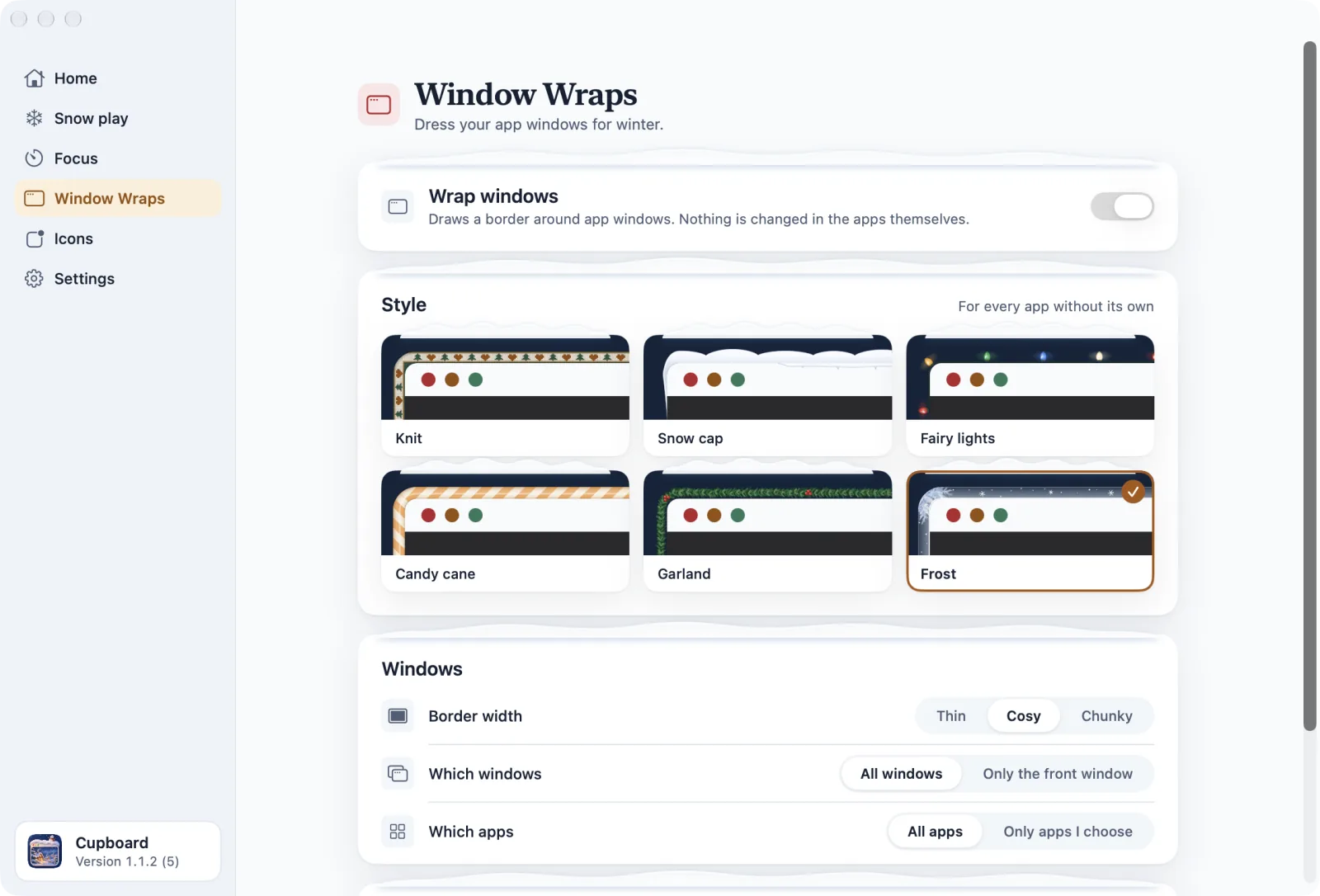
- Window Wraps: knitted bands, snow caps, fairy lights and garlands that drape over your open windows, with a choice for each app.
- A Focus timer that opens from the notch, six icon choices for Cupboard's own Dock icon, and a Santa flyover with a countdown on Christmas Eve.
It is a one-time purchase for one Mac, with future updates included, and it needs macOS 14 or later. You can see everything on the homepage.
The honest trade-offs
Nothing is free, even when it costs no money, so here is what you take on with an app like ours.
- It uses some energy. The motion runs in macOS's own animation engine, so the app does little drawing work itself, and it pauses when windows cover the desktop, when your Mac sleeps or locks, and in Low Power Mode. That keeps the cost low. It does not make it zero, and a still wallpaper is still lighter.
- It is another app. It runs from the menu bar, it needs updates, and it asks for permission for a few features.
- It is seasonal. A snowy desktop is lovely in December and odd in July. The app has rain, fireflies and night skies for the rest of the year, but it is mainly a winter product.
- It costs money. A one-time price, not a subscription, but still a price. If a free picture satisfies you, keep the money.
We would rather you knew that than found out after paying.
A quick way to decide
Ask yourself four questions.
- Do I want things to move? If not, stay with a still wallpaper.
- Do I care about battery above everything? If yes, stay with a still wallpaper, or try a live one and measure it. Our piece on live wallpapers, battery and performance shows how.
- Would I use the extras? The toys and the snow are not for everyone. If you would never touch them, you do not need them.
- Is it December? A seasonal app is at its best when the season is on.
If you answered yes to the first and third questions and are comfortable with the trade-offs, an app might be a good fit. If not, nothing is lost by staying with a picture. For a wider look at the middle ground, read snow on your Mac desktop: options compared.
You can do both
The choice is not final. Many people keep a favourite still image for the rest of the year, and put a live scene on for the month of December. Because Cupboard can show any of its paintings as a plain still wallpaper, you can also use it as a simple wallpaper app when you want a quiet desktop.
If you decide it is for you, here is where to get it. If you decide a still picture is enough, we hope the rest of our guides help you make it a good one.