Focus timers that feel calm
· 5 min read
How to pick session lengths, what makes a timer gentle, and a routine you will keep.

A timer is one of the simplest tools for getting work done, and also one of the easiest to get wrong. A harsh ring, a red countdown and a streak counter that scolds you can turn a helpful tool into one more source of stress. A calm timer does the opposite: it gives your work a gentle edge and then gets out of the way.
This guide explains why timers help, how to pick lengths that suit you, what to look for in one that feels calm, and how to build a routine that you will keep using.
Why a timer helps at all
Starting is the hardest part of most tasks. A timer turns "work on this report" into "work on this report for twenty-five minutes", which is a much smaller thing to agree to. It also gives you a built-in reason to stop, so you take the break that your body needs. And it makes distractions easier to resist, because you can tell yourself you will check the message when the timer ends, which is never far away.
There is no magic in the numbers. They are a framework for deciding when to start and when to rest. Treat any advice, including this, as a starting point.
Choosing a length that fits you
The best-known method, often called the Pomodoro technique, uses twenty-five minutes of work followed by a five-minute break, with a longer break after four rounds. It works well for many people. It is not the only option.
- 25 minutes suits routine or admin work, and anyone who finds a long stretch daunting.
- 50 minutes, with a ten-minute break, suits deeper work such as writing, design or coding, where getting into the zone takes a while.
- 15 minutes is useful for tasks you are avoiding. Fifteen minutes is short enough to start, and often you carry on after the timer ends.
- A custom length is best when you know your own rhythm. Try a few and keep the one where you feel pleasantly tired, not drained, at the end.
What makes a timer feel calm
Calm is a design choice. It shows up in small things.
- A soft ending. A gentle chime beats a blaring alarm, and a timer that lets you switch the sound off entirely is better still.
- Quiet while running. The countdown should be easy to glance at and impossible to obsess over. A timer that flashes or moves constantly will pull your eye.
- Out of the way. A small display near the top of the screen, or in the menu bar, uses little space and does not cover your work.
- No guilt. Streaks, scores and "you missed a session" messages turn rest into a chore. A calm timer lets you stop without being told off.
- A sense of passing time. A visual that changes slowly, like a candle burning down, shows progress without numbers demanding your attention.
- Respect for your privacy. If a timer records a history, it should be stored on your own machine, and you should be able to look at it or ignore it.
Using the tools you already have
You do not need an app to get started. macOS includes a Clock app with a timer, and Siri or Spotlight can start one with a short phrase. A kitchen timer on the desk works as well. If you want an automatic nudge, the Focus feature in System Settings can silence notifications for the length of your session, so you are not interrupted by banners.
- Set a Focus mode that allows only calls from the people who matter.
- Close the mail and chat apps for the length of a block. They can wait twenty-five minutes.
- Keep a notepad beside the keyboard. When a stray thought pops up, write it down and let it go.
A Focus timer that opens from the notch
We built a timer into Cupboard with calm as the main goal. On a Mac with a notch, the timer opens beside it, and on a Mac without one a small pill appears at the top centre of the screen. A shortcut, Option-Command-F, opens it either way. While you work, a candle burns down slowly, so you see time passing without a number to watch. Your history, including a private Insights view, stays on your Mac.
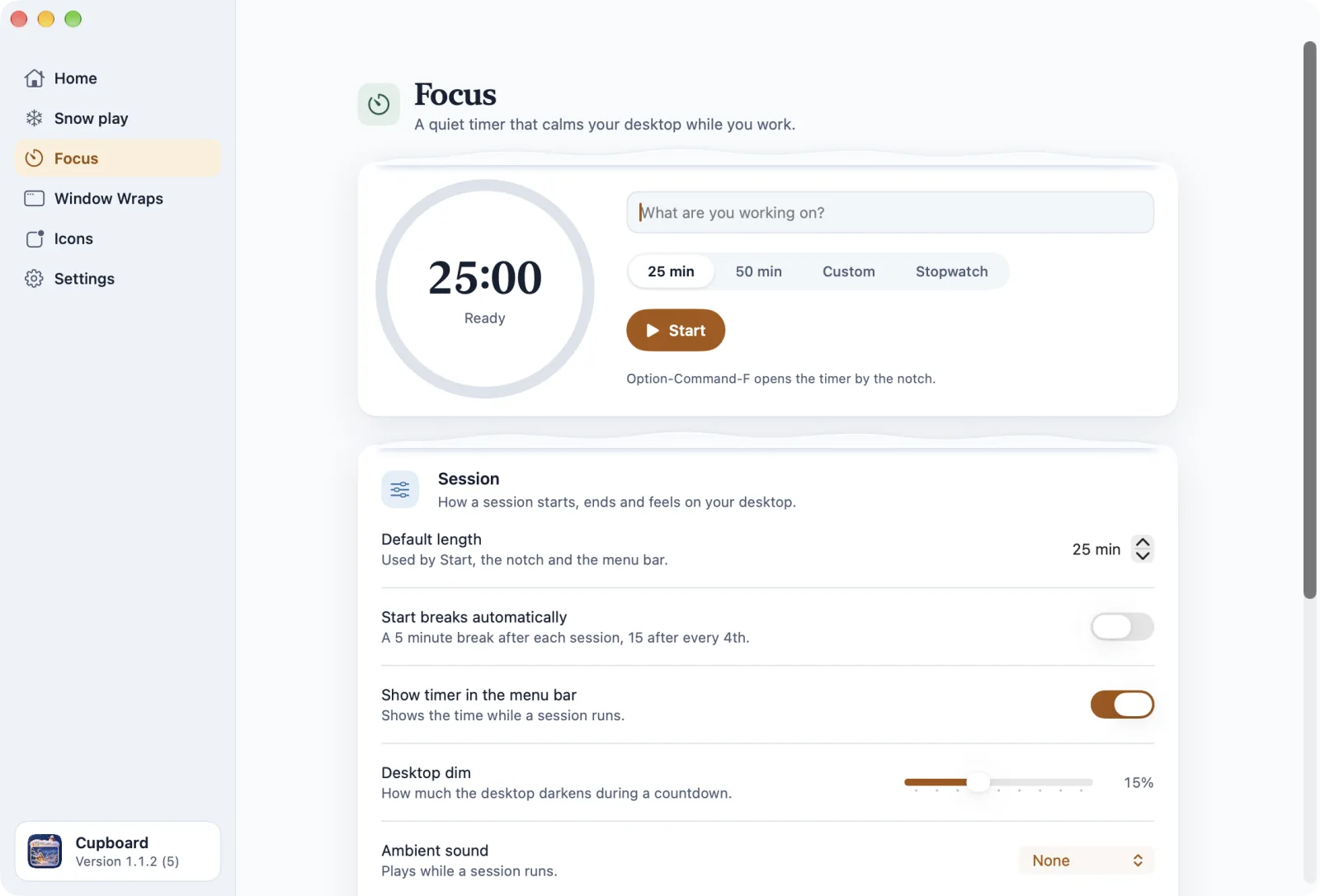
The point is not to make you more productive at any cost. It is to make a block of focused time feel warm and unhurried, in a scene you like. If you want to see more, the homepage shows the app, and you can get it here.
Build a routine around it
- Decide the one thing. Before you start the timer, name the task in a few words. Vague work leaks.
- Prepare the room. Water, warm drink, phone face down, door closed if you can.
- Start the timer and begin at once. Do not tidy first. The timer is the starting signal.
- When it ends, stop. Even if you are in flow, take at least a short pause. You can decide to continue after you have stood up.
- Use the break properly. Look out of a window, stretch, refill your water. Avoid social feeds, which feel like a break but do not rest your attention.
- End the day deliberately. Write down what you did and the first task for tomorrow.
Pair a timer with the right sound and light and it becomes a ritual. Our post on a hygge workspace setup covers the rest of the room.
When a timer does not help
Some work does not suit a countdown. If you are deep in flow and a chime breaks it, turn the timer off, or use a longer block. If a timer makes you anxious, use a stopwatch that counts up, or none at all. A tool is only useful if it makes the work feel easier.
The calmest timer is the one you stop noticing. If yours is asking for attention, it is time to simplify.